Latest Entries »

Showing posts with label firewall setting. Show all posts

.: How to configure Internet Connection Sharing in Windows XP :.

.: How to configure Internet Connection Sharing in Windows XP :.


How to use Internet Connection Sharing

To use Internet Connection Sharing to share your Internet connection, the host computer must have one network adapter that is configured to connect to the internal network, and one network adapter or modem that is configured to connect to the Internet.

On the host computer

On the host computer, follow these steps to share the Internet connection:
  1. Log on to the host computer as Administrator or as Owner.
  2. Click Start, and then click Control Panel.
  3. Click Network and Internet Connections.
  4. Click Network Connections.
  5. Right-click the connection that you use to connect to the Internet. For example, if you connect to the Internet by using a modem, right-click the connection that you want under Dial-up.
  6. Click Properties.
  7. Click the Advanced tab.
  8. Under Internet Connection Sharing, select the Allow other network users to connect through this computer's Internet connection check box.
  9. If you are sharing a dial-up Internet connection, select the Establish a dial-up connection whenever a computer on my network attempts to access the Internet check box if you want to permit your computer to automatically connect to the Internet.
  10. Click OK. You receive the following message:
    When Internet Connection Sharing is enabled, your LAN adapter will be set to use IP address 192.168.0.1. Your computer may lose connectivity with other computers on your network. If these other computers have static IP addresses, it is a good idea to set them to obtain their IP addresses automatically. Are you sure you want to enable Internet Connection Sharing?
  11. Click Yes.
The connection to the Internet is shared to other computers on the local area network (LAN). The network adapter that is connected to the LAN is configured with a static IP address of 192.168.0.1 and a subnet mask of 255.255.255.0

On the client computer

To connect to the Internet by using the shared connection, you must confirm the LAN adapter IP configuration, and then configure the client computer. To confirm the LAN adapter IP configuration, follow these steps:
  1. Log on to the client computer as Administrator or as Owner.
  2. Click Start, and then click Control Panel.
  3. Click Network and Internet Connections.
  4. Click Network Connections.
  5. Right-click Local Area Connection, and then click Properties.
  6. Click the General tab, click Internet Protocol (TCP/IP) in the This connection uses the following items list, and then click Properties.
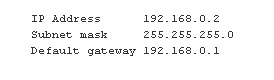
  7. In the Internet Protocol (TCP/IP) Properties dialog box, click Obtain an IP address automatically (if it is not already selected), and then click OK. Note You can also assign a unique static IP address in the range of 192.168.0.2 to 192.168.0.254. For example, you can assign the following static IP address, subnet mask, and default gateway:
      1. In the Local Area Connection Properties dialog box, click OK.
      1. Quit Control Panel.

To configure the client computer to use the shared Internet connection, follow these steps:
  1. Click Start, and then click Control Panel.
  2. Click Network and Internet Connections.
  3. Click Internet Options.
  4. In the Internet Properties dialog box, click the Connections tab.
  5. Click the Setup button. The New Connection Wizard starts.
  6. On the Welcome to the New Connection Wizard page, click Next.
  7. Click Connect to the Internet, and then click Next.
  8. Click Set up my connection manually, and then click Next.
  9. Click Connect using a broadband connection that is always on, and then clickNext.
  10. On the Completing the New Connection Wizard page, click Finish.
  11. Quit Control Panel.
When you now start Microsoft Internet Explorer, the client computer will try to connect to the Internet by using the host computer's shared Internet connection.

Troubleshooting

When you turn on Internet Connection Sharing on the host computer, the host computer's LAN adapter is automatically assigned the IP address of 192.168.0.1. Therefore, one of the following situations may occur:
  • IP address conflict Each computer on the LAN must have a unique IP address. If more than one computer has the same IP address, an IP conflict occurs, and one of the network adapters turns off until the conflict is resolved. To resolve this conflict, configure the client computer to automatically obtain an IP address, or assign it a unique IP address.
  • Loss of network connectivity If your network is configured with a different IP address range than Internet Connection Sharing uses, you will lose network connectivity with the host computer. To resolve this issue, configure the client computers to automatically obtain an IP address, or assign each client computer a unique IP address in the range of 192.168.0.2 to 192.168.0.254.

.: Recover your All windows password :.

.: Recover your All windows password :.

Hi friends,
here if you are forget your windows user password, don't worry its recover/brake by a software.
Its name is "OPHCRACK". Its open source software (free software).
OPHCRACK
download form here.

some step for recover/brake your password. follow the step and feel free for your lost password

step 1 : download software from here or ophcrack.sourceforge.net/ here.
step 2 : after downloading burn it on cd.
step 3 : Put the cd in the cd rom.
step 4 : Restart the computer and Goto yout BIOS.
step 5 : select BOOT form CD ROM.
step 6 : Again Restart the computer and follow the instruction.
step 7 : Its completed.

Its simple but RISKY.

Note : Do any think on own risk


pls like me Facebook and tell your frnds for like and visit my site if have you any prob mail me on prashant1879@live.com see this on you-tube.

.: Mobiola® Web Camera :.

.: Mobiola® Web Camera 3 :.

Turn your camera phone into a high quality wireless (WiFi or Bluetooth) or wired (USB) web camera. Mobile phone as webcam with Mobiola® Web Camera 3


http://image.wareseeker.com/software/Windows-Widgets/Webcams/details_mobiola-webcam-lite-1.0.jpg

Main Functionality

  • Transforms your mobile phone into a high-quality PC webcam.
  • Connects mobile phone to PC using USB, WiFi (select models) and Bluetooth connectivity.
  • BlackBerry Storm supported (USB connection).
  • Wi-Fi support for BlackBerry phones.
  • High Video transmission speed.
  • Screen Capture functionality, when device screen can be demonstrated on PC real-time.
  • Cool video effects. Have fun and impress your friends!
  • Works with Skype, Yahoo, YouTube, MSN, AOL IM, ICQ and many others as standard USB webcam.
  • Compatible with Symbian S60 and UIQ, Windows Mobile 5 and 6, Blackberry.
Watch Video about Mobiola™Web Camera
Thank you for your interest! Try Mobiola® webcam and start using your camera phone as webcam!

for more detail click here
& Download trial and Full

Its password is MOBIOLA_FULL

.: Make Own Search Engine :.

.: Make Own Search Engine :.

hello friends,
Now you can make your own Search engine with your "Google custom search" with extraordinary theme. here some photo graph of search engine.


for more detail CLICK HERE

.: Make your Personal Search Engine with your name :.


for make you search engine click here

.: How to configure Yahoo account on your nokia phone (N73/N95/...) :.

.: How to configure Yahoo account on your nokia phone (N73/N95/...) :.

here some information about Yahoo on your nokia phone without any software.

(IMP : You must enable POP3 access of yahoo mail account. Hint : Look inside ook inside Setting and POP forwarding Options on yahoo mail web site)
  • Open Messaging Application.
  • Goto Mail box. It asks you no mail defined. Define Now? choose "YES"
  • Mail setup wizard will start. press START to continue.
  • Mailbox Type choose POP3, Press next
  • On next screen type your Email address XXX@YAHOO.COM(IMP: press the Pencil key and highlight your email address then press copy. This will save you typing)
  • Press NEXT
  • Enter pop.mail.yahoo.fr as Incoming mail Server, Press NEXT
  • Enter smtp.mail.yahoo.fr as Outgoing mail server, Press NEXT
  • Acess Point, Choose Always ask or your preferred one , press NEXT
  • In mailbox name keep Yahoo, press NEXT
  • Click FINISH
  • Click Option and then setting
  • Choose E-mail
  • Press on Mailboxes and then on Yahoo
  • Press on connection setting
  • Press on Incoming E-mail
  • Enter Username as XXX@yahoo.com (You may press pencil and then paste)
  • In Password type your password
  • Scroll down to security port and choose SSL/TLS
  • Press back button
  • select Outgoing E-mail, Enter your username and password as described above
  • Scroll down to security port and choose SSL/TLS
  • Hit back button twice
  • Press on User setting
  • Enter your name as you want to display and then go back
  • Goto Retrival Settings
  • Click on E-mail to retrive and setting it to size limit and then enter 100 KB or whatever you like in next screen.Press Ok
  • Click on Back
  • If you have Unlimited GPRS connection then goto automatic retrieval and change it otherwise leave as it is.
  • Click back button multiple times so that you are back to main screen.
  • Now when you start Messaging Application you will see the Yahoo account goto it and retrieve your E-mail.
  • You can also send E-mail attach images,file and etc, Have fun ;)

.: Common types of protocols :.

Common types of protocols


  • FTP (File Transfer Protocol)

  • Telnet (Telnet Remote Protocol)

  • SSH (Secure Shell Remote Protocol)

  • POP3 (Post Office Protocol 3)

  • SMTP (Simple Mail Transfer Protocol)

  • IMAP (Internet Message Access Protocol)

  • SOAP (Simple Object Access Protocol)

  • PPP (Point-to-Point Protocol)

  • RFB (Remote Framebuffer Protocol)

-: This article from Wikipedia

.: Personal Firewall Recommendations :.

Personal Firewall Recommendations

Knowledgeable people say that an un-protected machine that is connected to the Internet can and will probably be penetrated within 72 hours or less. Without proper protection chances are you will be targeted and penetrated - even if you have nothing secret or important to hide.

That is why you MUST install and properly configure a firewall on your computer (the one that is connected to the Internet), or on a dedicated computer that will act as a dedicated firewall.

I've used many free/low-cost firewalls on various operating systems and different network scenarios. I'll try to create a full section out of this page it the future, full with reviews and pros/cons for each deal. For now I'll give you a list of links you can go through.

Note: The next firewall products are not listed in any particular order. Some of these products are free for all, some are free for home users, and others offer a shareware or limited-capability version you can download. Remember that links and product versions might change without notice.

Tiny Personal Firewall v3.08

Tiny Personal Firewall represents smart, easy-to-use personal security technology that fully protects personal computers against hackers. Built on ICSA-certified security technology, it is also an integral part of The Tiny Software Centrally Managed Desktop Security system selected by the US Air Force for its approximately 500,000 desktop computers.

http://www.tinysoftware.com/home/tiny2?la=EN

Windows XP Internet Connection Firewall

Windows XP includes Internet Connection Firewall (ICF) software you can use to restrict what information is communicated between the Internet and your home or small office network. ICF also protects a single computer connected to the Internet with a cable modem, a DSL modem, or a dial–up modem.

http://www.microsoft.com/windowsxp/pro/using/howto/networking/icf.asp

Sygate Personal Firewall Pro v5.0

Sygate Personal Firewall Pro offers unparalleled protection against malicious intrusion attempts by hackers, script kiddies, and cracks. With the combined power of bi-directional intrusion detection, vulnerability assessment, and extensive logging and forensics capabilities, you can't find a better protection package.

http://soho.sygate.com/products/pspf_ov.htm

DeerField VisNetic Firewall v1.2

VisNetic Firewall delivers protection to security-conscious professionals. More secure than the average personal firewall or application-level firewall, yet more cost effective than high-end firewalls, VisNetic Firewall provides peace-of-mind through comprehensive intrusion protection. VisNetic Firewall examines each packet being sent, inside and outside of the network to verify whether the packet is allowed or denied access through the firewall. VisNetic Firewall guards the computers of Telecommuters/Mobile Users, Windows-based Workstations, Windows-based Servers, and Business Networks.

http://www.deerfield.com/products/visnetic_firewall/

ZoneAlarm Plus 3.1

ZoneAlarm Plus 3.1 represents the next generation of personal Internet security. ZoneAlarm Plus protects the PC from intrusions and hostile attacks by combining a personal firewall with Program Control. ZoneAlarm Plus was designed from the ground up to offer something for everyone: from "set and forget" users seeking easy, instant security, to tech-savvy users seeking powerful control and customization. ZoneAlarm Plus also offers powerful security features, intuitive support for wireless networks, and a robust user feedback and analysis engine. ZoneAlarm Plus 3.1 provides advanced program control that 'fingerprints' not only the applications that have been granted permission to access the Internet, but also the components of the applications at the .DLL level. This helps ensure that rogue code masquerading as a trusted application in order to gain unauthorized access cannot be inserted onto a PC.

http://www.zonelabs.com/store/content/catalog/products/zaPlus/zaPlus_details.jsp

ZoneAlarm Pro 3.1

ZoneAlarm Pro is the award-winning PC firewall that keeps your personal data and privacy safe from Internet hackers and data thieves. ZoneAlarm Pro 3.1 doubles your protection with Cookie Control and Ad Blocking for a faster, safer Internet experience. Unlike other personal firewalls, ZoneAlarm Pro includes Program Control to protect against known and unknown Internet threats. Program Control monitors all outbound traffic to prevent rogue programs from transferring your valuable data to a hacker. With ZoneAlarm Pro, you're in control with the ability to specify which programs, known or unknown, can be trusted to access the Internet.

http://www.zonelabs.com/store/content/catalog/products/zap/zap_details.jsp

ZoneAlarm 3.1 Free version

ZoneAlarm makes it easy. Unlike other personal firewalls, ZoneAlarm protects automatically from the moment it's installed - no programming required. ZoneAlarm delivers simplicity without compromising your security. Getting Started tutorial explains Controls and Alerts to get you up and running quickly. And, to keep you confident that you're always protected, intuitive color-coded alerts rate security risks - in real time.

http://www.zonelabs.com/store/content/catalog/products/zonealarm/znalm_details.jsp

Agnitum Outpost Firewall Pro v1.0

The Outpost Personal Firewall system is the world's most advanced firewall software for Windows. It combines power and advanced features with a remarkably easy-to-use interface. With Outpost, you'll have: Filters the viruses, worms, and trojans out of your e-mails; Puts your computer into stealth mode, making it invisible to crackers; and blocks attacks and intrusions from hackers; Prevents sending your personal information to the bad guys; Blocks web sites' attempts to gather information about your browsing habits; and guarantees peace of mind from invasion of your privacy through the Internet. It protects your children from illegal, inappropriate web sites; Allows businesses to control the content that is allowed to be viewed by employees; Offers complete flexibility for power users who want to fine-tune their firewall protection.

http://www.agnitum.com/products/outpost/download.php

BlackICE 3.5 PC Protection

BlackICE is professional-strength protection for your PC. BlackICE PC Protection features both an intrusion detection system and a personal firewall for a one-two punch of protection. BlackICE automatically detects and blocks attacks through a comprehensive inspection of all inbound and outbound information to your computer. And BlackICE PC Protection is constantly working to secure your dial-up, DSL, and cable modem from hackers 24 hours a day, every day of the year.

http://blackice.iss.net/

NetWatcher 2000 Intrusion Detection

When it detects an intrusion, NetWatcher alerts you immediately and provides you with all the information you need to report an intruder. NetWatcher logs the date, time, IP address, port number and host used by anyone trying to get into your system - giving you everything you need to report uninvited guests to their Internet Service Provider.

http://www.moonlight-software.com/netwatcher.htm

McAfee Personal Firewall Plus

With McAfee Personal Firewall Plus you can take control of your online security. Personal Firewall Plus places a barrier between the Internet and your PC, helping to block hackers from accessing your computer and allowing you to digitally 'fingerprint' trusted applications. Personal Firewall Plus also gives you the unique ability to track the apparent source of an attack on a world map and obtain detailed identification information on the originating source IP address. Every time your computer is probed or attacked, you get detailed reports and clear follow-up options. Learn what happens to your PC and report hacker activity to conveniently assist law enforcement.

http://www.mcafee.com/myapps/mpfp/default.asp

McAfee Internet Security 5.0

Which, among other features, includes the latest version of McAfee Firewall. McAfee Firewall enables you to control the communications in and out of your PC and helps keep hackers at bay. With powerful Application Control, Intrusion Detection, and easy Home Networking and Custom Rule Creation Wizards, McAfee Firewall provides essential security for your Internet connection.

http://www.mcafee.com/myapps/is5/default.asp

MacAfee Virusscan Professional v7.00

Excellent virus scanner incorporating a suite of security tools, including system/e-mail/system scan, internet filter, and MacAfee firewall. this latest version also includes visual trace for finding information/troubleshooting connection problems, and quickclean lite for cleaning up unused/temporary files on your hard drive, and secure data shredding for permanently deleting files.

http://www.mcafee.com/myapps/vs7pro/default.asp

Symantec Norton Internet Security 2003

Symantec's Norton Internet Security 2003 provides essential protection from viruses, hackers, and privacy threats. Included are full versions of Norton AntiVirus and Norton Personal Firewall, which efficiently defend your PC from the most common Internet dangers. You also get Norton Spam Alert to block unwanted e-mail, and Norton Parental Control to protect your children online.

http://www.symantec.com/sabu/nis/nis_pe/

Symantec Norton Personal Firewall 2003

Symantec's Norton Personal Firewall 2003 keeps hackers out and personal data in. Its robust defenses include intrusion detection, application control, and privacy protection in one easy program. It hides your PC from hackers, blocks suspicious incoming connections, stops malicious programs from spying on your system, and prevents confidential information from being sent out without your knowledge.

http://www.symantec.com/sabu/nis/npf/

Kerio Personal Firewall free version 2.1

Kerio Personal Firewall (KPF) is a software agent that builds a barrier between your personal computer and the Internet. KPF is designed to protect your PC against attacks from both the Internet, and other computers in the local network. KPF controls all data flow in both directions – from the Internet to your computer and vice versa, and it can block all attempted communication allowing only what you choose to permit. This makes KPF an ideal solution for notebook computers that freely travel in and out of the corporate network, facing exposure to various risks as they connect from different locations.

http://www.kerio.com/us/kpf_home.html

Kerio WinRoute Pro 4.22

Network firewall for mid-sized businesses, Kerio WinRoute Pro is a robust network firewall that protects your network from hackers and Internet threats. It easily connects the network to the Internet using various access devices. Built-in mail server allows users to have their own corporate e-mail. Kerio WinRoute Pro runs on all Windows-based systems and can serve any computer (client) within the corporate network using TCP/IP regardless to whether it runs Linux, Mac OS, Unix or AS400 operating systems.

http://www.kerio.com/us/wrp_home.html

PC Cillin 2002

PC-cillin 2002 protects against new, unknown, and script-based viruses through enhanced antivirus scanning. PC-cillin 2002 also includes a personal firewall for secure Internet computing. With adjustable security levels, a trusted-site list, and port-blocking capabilities, PC-cillin's personal firewall helps you keep your computer safe from malicious programs and Internet intruders.

http://www.trendmicro.com/en/products/desktop/pc-cillin/evaluate/overview.htm

Look 'n' Stop 2.03

Your permanent Internet connection can be scanned permanently from the outside. It requires a protection against Internet hackers. Look 'n' Stop provides a permanent and highly secured protection against Internet hackers attacks. Look 'n' Stop protects you against the programs like "Trojan horse" that try to transmit your personal data to the outside without your agreement.

http://www.looknstop.com/En/index2.htm

Security Focus Online has a very good article about personal firewalls:

http://online.securityfocus.com/infocus/1573

I will also add more pages on this topic later, when time permits.

 
Ask a Question on Tech1879